How to Apply to College or University in British Columbia
A guide to using EducationPlannerBC to get your college or uni application in on time.

So you've decided to apply to college or university in British Columbia. Great choice! After all, west coast = best coast. If you're wondering what the application process looks like, or just need a hand getting through it, look no further.
Researching your options for programs and schools
But before we get started, be sure you've done some solid research.
Compare programs and schools, and think about where you want your career to take you after graduation. Doing your homework will help you make the right choice. Check out SchoolFinder.com (for Canadian students) and StudyinCanada.com (for international students considering Canada) for info on program requirements, admissions, potential career pathways, and more.
BC doesn't have one application deadline covering every college, university, and program. Each institution sets its own opening and closing dates, and competitive or specialized programs may close earlier than others. Check the program listing and the institution's official website for info on current deadlines.
Starting your application to a BC college or university
When you're ready, create a free EducationPlannerBC account. The service connects applicants with all 25 of BC's public post-secondary institutions. Most applications can be completed through EducationPlannerBC, but some institutions or programs may direct you to an external application site, so review the application instructions carefully before starting.
A quick exception: Royal Roads University is currently listed as an external application institution. You can select it through EducationPlannerBC, but you'll be directed to RRU's external application site to complete the process.
Otherwise, private post-secondary institutions have their own application instructions. Check the school's official website to confirm where and how to apply.
Filling out your personal profile
When setting up your EducationPlannerBC account, first you'll enter your personal details, contact info, and academic history, including any high schools or post-secondary schools you've attended. Create your account using an active personal email! Avoid using your high school email, since it may be deactivated after you graduate. Institutions will use this email address to contact you about your application.
If you attended high school in BC, have your Personal Education Number, or PEN, available. Your PEN may be required to connect your application with your BC education records.
If you attended high school in British Columbia or Yukon, review the instructions for using the StudentTranscripts Service. If you attended school in another province or country, follow the transcript instructions provided by your school, school district, and the institution to which you are applying.
Complete all required sections of your profile and application. The system will identify any missing information before you can submit. Once you've reviewed your application, completed all required fields, and submitted payment, your application will be sent to the institution.
The EducationPlannerBC website has a great FAQ section so you can get help, by the way!
Choosing the first institution to apply to
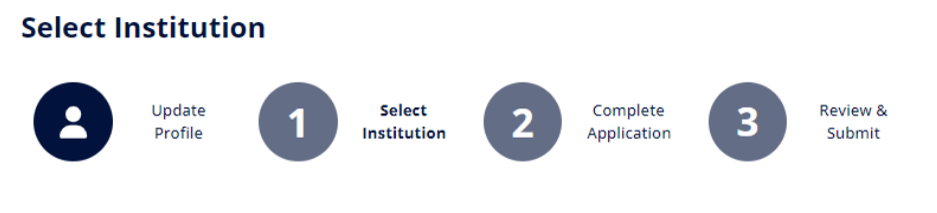
Choose the institution you're interested in, and make sure you carefully read the Information for Applicants to find specific info from that school. This might include details on apprenticeship options, or specific instructions for international applicants with particular citizenship. Follow the directions if they apply to you.

Choosing a program for your application
Next, tell the system which program you want to apply to. Select the institution, program, and intended start date carefully. Not every program can be applied to through the EducationPlannerBC application form. If a program uses a separate process, follow the instructions provided on the institution's website.
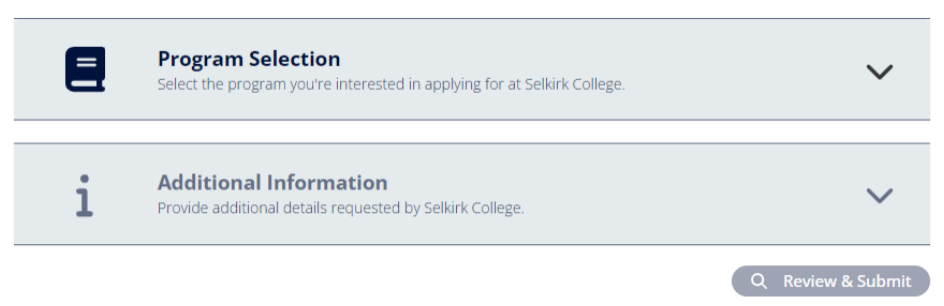
The application may ask about your citizenship or immigration status, previous attendance at the institution, intended start date, and whether you're applying as a new, returning, or current student. The questions and available applicant categories vary by institution and program, so choose the option that matches the definitions shown in your application.
Additional requirements and the application fee
Some colleges or universities may want more details from you, which comes in the Additional Information section. You may be asked about Indigenous identity, support services, international scholarship funding, or anything else the school may want to know. Some questions may be program-specific, too.
When you're finished, choose "Review & Submit" to check your details one last time before sending in your application! EducationPlannerBC can't change an application after it has been submitted, so take your time to ensure you have the details right.
You will normally need to pay an application fee before submitting. Fees vary by institution, program, and citizenship status. Review the amount and accepted payment methods shown in your application before submitting, since application fees may not be refundable.

Congratulations, you've successfully applied to a BC institution. Want to apply to even more? Pick another school and follow the same process.
Next steps after your application is complete
After submitting, your application information is sent directly to the institution, which will contact you about enrolment, registration, supporting documents, or other next steps.
Admission timelines vary by institution, program, intake, and applicant type. Watch the email address associated with your application and follow the institution's applicant portal or instructions for updates, document requests, and admission decisions.
Keep an eye on your inbox and your spam filter. If you have specific questions for schools — before, during or after your application — you can reach out directly. EducationPlannerBC has a list of contact details to help you.
We wish you all the best in your studies! Check back in at SchoolFinder and StudyinCanada.com now and then to find articles, tips, and advice to support you, from your first semester through to your career.
Enjoy your studies! Be sure to check out sites like ScholarshipsCanada.com to help you find scholarship and bursary opportunities, info on student loans, and more.
Explore scholarship opportunities